May 21, 2026 · Industry
Localization Quality Assurance for SaaS Teams: What to Check Before You Ship
73% of SaaS teams find errors via user reports, not QA. Learn how localization quality assurance catches broken variables, HTML, glossary, and length.
A native-speaker reviewer edits an AI-translated string and renames
{userName}to{nomUtilisateur}. The variable no longer resolves. The label now reads{nomUtilisateur}in production for every French user. Manual review passed it — the reviewer was reading for meaning. An automated check would have caught it in under a second.
What localization quality assurance actually means
Localization quality assurance is the process of verifying that translations are correct before they reach users — covering both translation quality assurance (is the meaning accurate?) and structural integrity (are variables, tags, and glossary terms intact?). It is two separate jobs with two different tools: automated checks for structural errors, and human review for linguistic judgment.
Most teams conflate them. They send strings to a bilingual team member and call it done. The reviewer catches tone problems. They do not catch a missing variable because they are reading for meaning, not running a pattern match.
The numbers bear this out. A 2026 developer survey of 1,000 engineering and product teams found that 73% discover translation errors in production via user reports (IntlPull, State of i18n 2026). Not QA. Not testing. User complaints. The same survey found that 52% have no systematic QA process beyond manual spot-checking.
Manual spot-checking is not a QA process. It is a lottery.
The structural errors are the ones worth automating. Here is what they look like.
The five types of localization QA checks
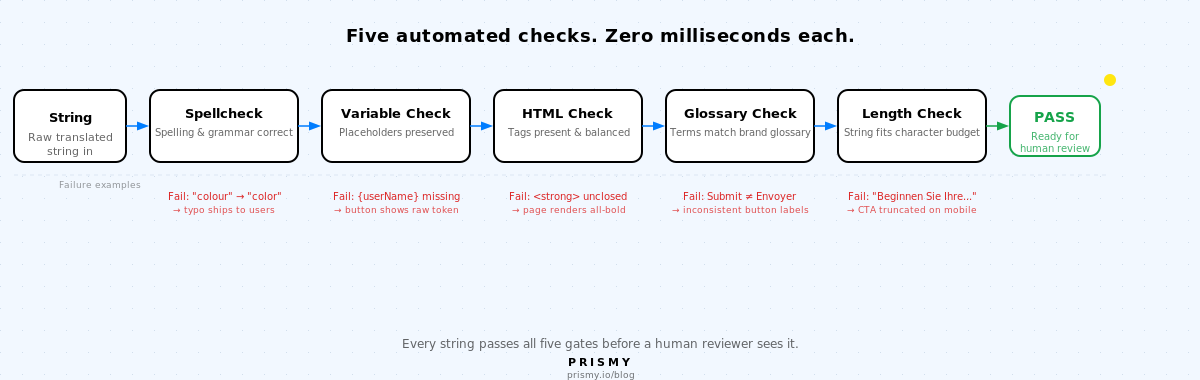
Every translation string passes through five automated checks before a human reviewer ever sees it. Each one catches a failure class that manual review consistently misses.
1. Spellcheck
Every translation key must be free of spelling and grammar errors.
The failure mode: an AI-translated string or a human edit introduces a typo, a wrong verb form, or a grammar slip that goes unnoticed because no one is explicitly looking for it. Manual review catches many of these, but reviewers reading for meaning miss subtle errors — especially in languages they are not fully fluent in.
Automated spellcheck runs against each translation key in each locale before the string reaches a reviewer. It flags spelling errors and basic grammar issues in under a millisecond, at scale, across every language in parallel.
2. Variable preservation
Every interpolation placeholder in the source string must appear in the translated string, with the correct format.
The failure mode: a native-speaker reviewer edits an AI-translated string and renames the variable — {userName} becomes {nomUtilisateur}, or they drop it entirely when rephrasing. The variable no longer resolves. In production, users see the raw placeholder instead of their name. AI translation handles this correctly; the error is introduced when a human edits the output without realizing the variable is load-bearing.
This is automatable with a simple pattern match. The check runs in under a millisecond. The same survey found 61% of teams have experienced broken placeholder variables in production. Every one of those failures passed a human review.
3. HTML and tag integrity
Every HTML tag in the source string must be present and balanced in the translation.
The failure mode: a translator works in plain-text mode, or a machine translation system drops a closing tag when reconstructing the string. The source reads Your subscription is <strong>active</strong>. The translation reads Votre abonnement est <strong>actif. Missing </strong>. The rest of the page renders bold.
Automated tag-balance checks catch this. 41% of teams have shipped broken translations that broke UI layout, according to the same survey. HTML tag loss is one of the top causes.
4. Glossary consistency
Every term in the brand glossary must appear with its correct translation in each language, consistently across all strings.
Without a glossary check, translators make independent word-level decisions. "Submit" becomes "Soumettre" in one string and "Envoyer" in another. "Free trial" becomes "Essai gratuit" on the pricing page and "Essai offert" in the onboarding flow. Users notice. Support tickets mention "the confusing button."
58% of teams report incorrect terminology and inconsistent terms as a production error type. The fix is not better translators. It is a glossary that the evaluator checks on every string.
The real work is done on the glossary. We need to ensure that translations of key terms are correct in the new language. That is where we spend the most time.Alexis Toyane, Product Lead at Figures
Figures scaled from two languages to nine. The glossary was not the overhead. It was the foundation. See how they got there: Figures scaled to nine languages.
5. Length and overflow
The translated string must fit the UI element it will occupy. German copy runs 30-40% longer than English. Japanese may be shorter but require different line-height rules.
Nobody checks length until the string is in the running app. The TMS shows the raw string, not the rendered button. A German call-to-action that should read "Start your free trial" becomes "Beginnen Sie Ihre kostenlose..." and gets cut off at the button border. The primary CTA is invisible in one of your top markets.
67% of teams have experienced text overflow and truncation in production. Setting character budgets per string and checking against them at the string level catches the long tail before the render.
Why manual review misses structural errors
A human reviewer reads for meaning. They will catch a tone mismatch, a cultural slip, a phrase that sounds wooden in Portuguese. They will not catch {userName} sitting unresolved in the string because they subconsciously read it as a filled value.
Reviewers also work at scale: 20-50 strings per hour is a realistic pace for careful review. A 50-string release across five languages means 250 string-reviews. Structural checks run across the same 250 strings in milliseconds.
The data from Common Sense Advisory's 2025 survey is direct: automated QA catches 70-80% of all translation issues, rising to 90-94% for teams with strict glossary management. The remaining 6-30% are linguistic and cultural, requiring human judgment. That is the division of labor.
The cost case closes it. Fixing a translation error after it reaches production costs 8-12x more than catching it during translation (Nimdzi). For a team running five languages with two releases per month, that math changes fast.
You have three common starting points:
If you are on a manual process: your bilingual reviewer catches the linguistic 20%. The structural 80% ships. The variable your reviewer did not notice is now in front of 2,000 German users.
If you are on an enterprise TMS: your QA tab exists, but it runs inside a platform. If strings get copy-pasted out of the TMS before deployment, the QA tab never saw them. The structural errors leave through the side door.
If you are on a dev-only CLI: your CI validates file syntax. It does not validate variable preservation, tag integrity, or glossary consistency. Those checks require awareness of the string content, not just its format.
What a systematic localization QA process looks like
A systematic process runs the five automated checks at two moments, then adds human review on top:
Run the five evaluators continuously as wording is updated. The checks run automatically in two places. When AI translations are generated, Prismy's AI translation engine runs spellcheck, variable preservation, HTML integrity, glossary consistency, and length checks at generation time — structural errors never enter the translation files. Inline while editing, in the Prismy webapp and in the Chrome extension, editors see issues flagged in real time before they commit a change. Fix it before it ships, not after.
Run the evaluators once on your existing wording when you first set up Prismy. Most teams have translation files built over years — strings written by humans, copy-pasted between tools, edited without evaluators watching. That backlog has variables quietly broken, glossary terms applied inconsistently, and lengths that overflow on screens no one checked. A one-time audit pass surfaces all of it before you go live.
Prismy's evaluators handle both moments automatically: spellcheck, variable check, HTML integrity, glossary match, and length budget run on every Git-native pull request and inline in the editor. For the AI translation quality that feeds the process upstream, see the full guide.
-
SpellcheckAutomatablePick three translation keys across your most-used locales and run them through a spellcheck tool. Typos and grammar slips that reviewers read past show up immediately.
-
Variable preservationAutomatableSearch your translated files for any
{,%, or{{that appears in the source but not in the translation. If you find one, your QA process did not catch it. -
HTML tag integrityAutomatableRun a tag-balance check on any translated strings that contain HTML. An unclosed
<strong>or<a>in production will cascade bold or link styling across a paragraph. -
Glossary consistencyAutomatablePick three key product terms (your primary CTA, your product name, a feature name). Check whether they are translated the same way in every string across every language. If not, you need a glossary check in your evaluator.
-
Length and overflowAutomatableLoad your product in German or another long-expansion language. Check every button and label for truncation. If anything is cut off, your character budgets are not checked at QA time.
FAQ
What is the difference between localization QA and translation review?
Translation review is a human checking quality: tone, accuracy, fluency. Localization quality assurance includes that, plus automated mechanical checks: spellcheck, variables, HTML, glossary, length. QA should run before human review, not instead of it. The automated layer clears the structural errors so the human reviewer focuses on judgment.
How do you test localization before release?
Four steps: automated evaluators on every pull request (spellcheck, variables, HTML, glossary, length), in-context human review in the running app, a lightweight release smoke test across one language, and a quarterly glossary audit to keep the automated checks current with your product terminology. A solid translation QA process also includes localization testing in real device/screen contexts to catch overflow and rendering issues that string-level checks miss.
What causes translation quality assurance failures in production?
Usually not the translator. Usually the process. Missing variables slip through when translators work in plain text without evaluators watching. Glossary drift happens when no check enforces terminology. Length overflow happens when nobody tests rendered strings in a real UI. Most production translation errors are structural, not linguistic, and most structural errors are automatable.
Can automated tools replace human translation review?
For structural errors (spellcheck, variables, HTML, glossary, length): yes, and they do it more consistently and faster than a human. For linguistic judgment (tone, cultural fit, nuance): no. A complete localization QA process uses both: automated checks clear the mechanical failures, human review catches the linguistic ones. The 70-94% automated catch rate leaves 6-30% for human reviewers to focus on.
Don't miss our industry insights!
Get the latest insights on localization, AI translations, and product updates delivered to your inbox.
No spam, unsubscribe at any time. We respect your privacy.

Go global, the simple and powerful way.