GitHub-Lokalisierung:
Liefern Sie jede Funktion bereits übersetzt aus,
Texte von Ihrem gesamten Team verantwortet
Ihr Team liefert Funktionen aus. Prismy übernimmt die Lokalisierung. Installieren Sie die GitHub-App in 5 Minuten, erkennen Sie fehlende Übersetzungen automatisch in jedem PR, generieren Sie sie mit einem Klick und lassen Sie jede Person Texte ohne Developer-Ticket aktualisieren.
Native GitHub-App-Integration
|
Funktioniert mit GitHub.com und GitHub Enterprise
Die Lokalisierung Ihres Produkts auf GitHub sollte nicht so kompliziert sein
Ohne Prismy blockiert die Lokalisierung jedes Release
| # | Was schiefgeht | Die Auswirkungen |
|---|---|---|
| 1 | Releases werden blockiert, während auf Übersetzungen gewartet wird | Funktionen werden zurückgehalten, bis der Lokalisierungsdurchlauf aufholt. |
| 2 | KI-Übersetzungen von Cursor oder ChatGPT sind inkonsistent | Terminologie, Tonalität und Markenstimme variieren bei jeder Generierung. |
| 3 | Entwickler werden zum Engpass für jede Textänderung | Ein Tippfehler erfordert ein Ticket, einen PR und einen Entwickler, um ihn zu Review. |
| 4 | JSON-Übersetzungsdateien verursachen bei jedem parallelen PR Merge-Konflikte | Jemand muss immer rebasen, auflösen und erneut testen. Branches brechen still. |
| 5 | Nicht-Developer-Reviewer bearbeiten Texte in GitHub-Diffs oder Tabellen. | Entwickler müssen dennoch jede Änderung prüfen, um sicherzustellen, dass Variablen und i18n-Tags nicht beschädigt sind. |
Mit Prismy sparen Sie bis zu 4 Stunden pro Woche pro Teammitglied.
| # | Was passiert | Der Unterschied |
|---|---|---|
| 1 | Prismy erkennt neue Strings in jedem PR-Diff | Das Team bekommt ein klares Signal: fehlende Übersetzungen in FR, DE, ES. Mit einem Klick direkt aus dem PR-Kommentar generieren. |
| 2 | KI-Übersetzungen nutzen Ihr Glossar und Ihre Anweisungen. | Das Ergebnis passt zu Ihrem Produkttext. Reviewer polieren in 15 Minuten, nicht in 3 Stunden. |
| 3 | Jeder kann Texte direkt bearbeiten, ohne Entwickler einzubeziehen. | PMs und Übersetzer ändern Texte auf Feature-Branches oder über automatisch erstellte PRs. |
| 4 | Prismys PRs werden automatisch rebaset und nacheinander verarbeitet | Null Merge-Konflikte bei Ihren Übersetzungsdateien. Ihre Branches bleiben sauber. |
| 5 | Prismy validiert die Syntax: Nicht-Entwickler können keine Variablen oder i18n-Tags zerstören. | Der Editor erzwingt bei jedem Speichern die Struktur. Variablen, Pluralisierungsregeln und HTML-Tags bleiben intakt, egal wer bearbeitet. |
Das war's. Kein Skript zu verwalten, qualitativ hochwertige Übersetzungen, kein Engpass.
GitHub-Lokalisierung, die so arbeitet wie Entwickler.
Prismy verbindet sich als native GitHub App mit Ihrem GitHub-Repository und arbeitet dort, wo Ihr Team schon arbeitet: in Ihren Pull Requests und Ihrer Web-App.
Von fehlenden Strings zu produktionsreifen Übersetzungen, direkt in Ihrem PR
KI-Übersetzungen mit Ihrem Glossar und Ihren Anweisungen. Reviewer polieren in 15 Minuten, nicht in 3 Stunden.
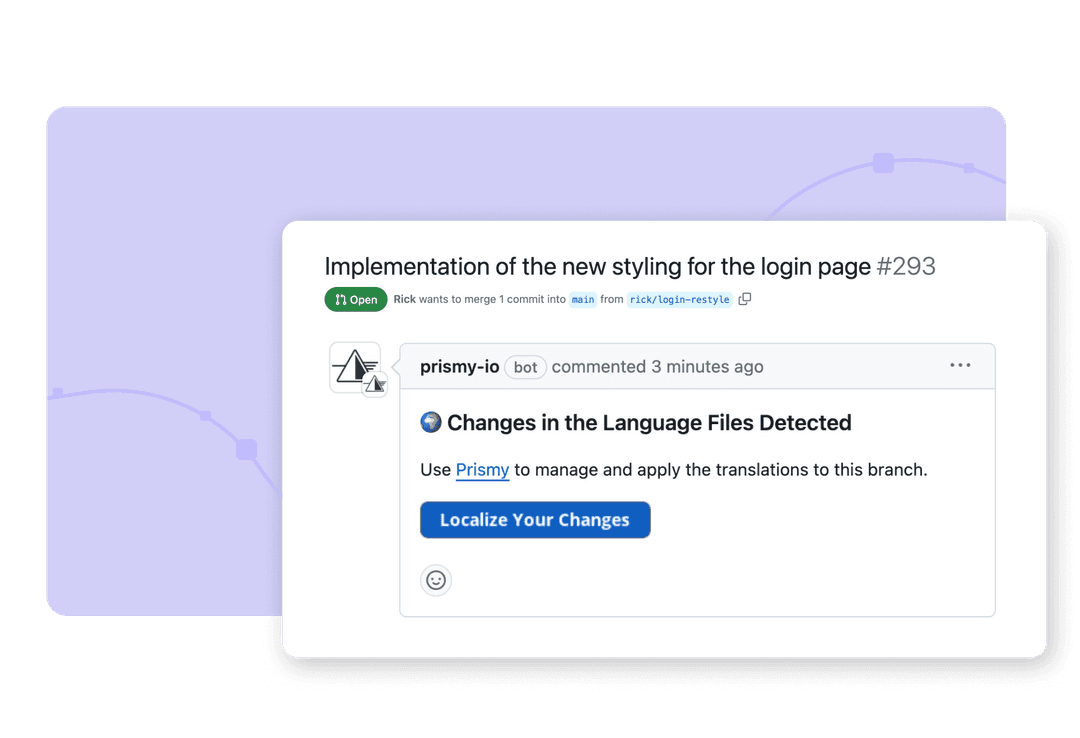
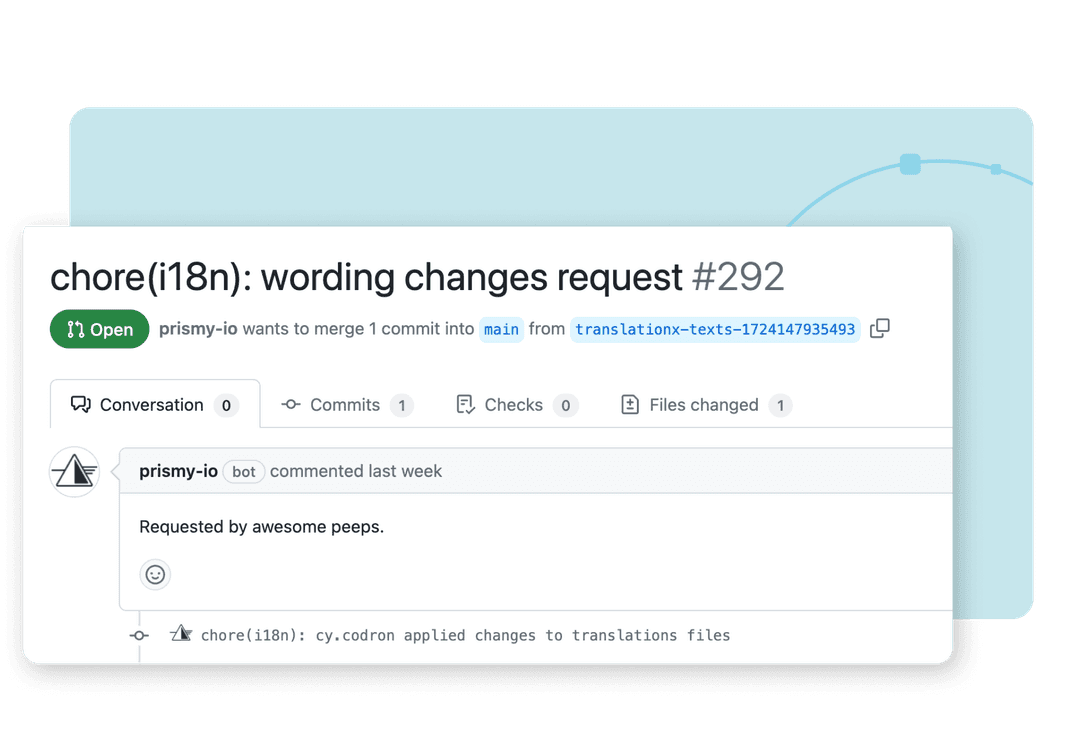
Wenn ein Entwickler einen Pull Request öffnet, der eine Übersetzungsdatei ändert oder einen neuen Key hinzufügt, kommentiert Prismy direkt im PR jede fehlende Übersetzung. Ein Klick erzeugt KI-Übersetzungen für alle Ihre Sprachen, mit den benutzerdefinierten Anweisungen Ihres PM, Ihrem Unternehmens-Glossar und dem Kontext aus jeder Übersetzung, die Ihr Team bereits freigegeben hat. Kein generischer KI-Output. Prismy committet die Übersetzungen in denselben Branch. Reviewer schärfen Texte in 15 Minuten nach, nicht in 3 Stunden.
Jeder in Ihrem Team kann Textänderungen vornehmen
Entwickler sind nicht mehr der Engpass. PMs, Übersetzer und Reviewer bearbeiten Texte, ohne Code zu berühren.
Sobald der Entwickler die GitHub App installiert, ist Text nicht mehr Aufgabe der Entwickler. PMs und Übersetzer bearbeiten auf einem Feature Branch vor dem Release. Änderungen werden direkt committet. Für Änderungen in der Produktion öffnet Prismy automatisch einen sauberen, konfliktfreien Pull Request. Keine JSON-Dateien zum Öffnen. Kein GitHub-Zugriff für Nicht-Entwickler nötig. Keine Tickets. Reviewer können auch Prismys Chrome-Erweiterung nutzen, um Texte direkt im Live-Produkt im WYSIWYG-Stil zu bearbeiten, ohne Code zu berühren.
Geben Sie Übersetzern automatisch den vollständigen Kontext.
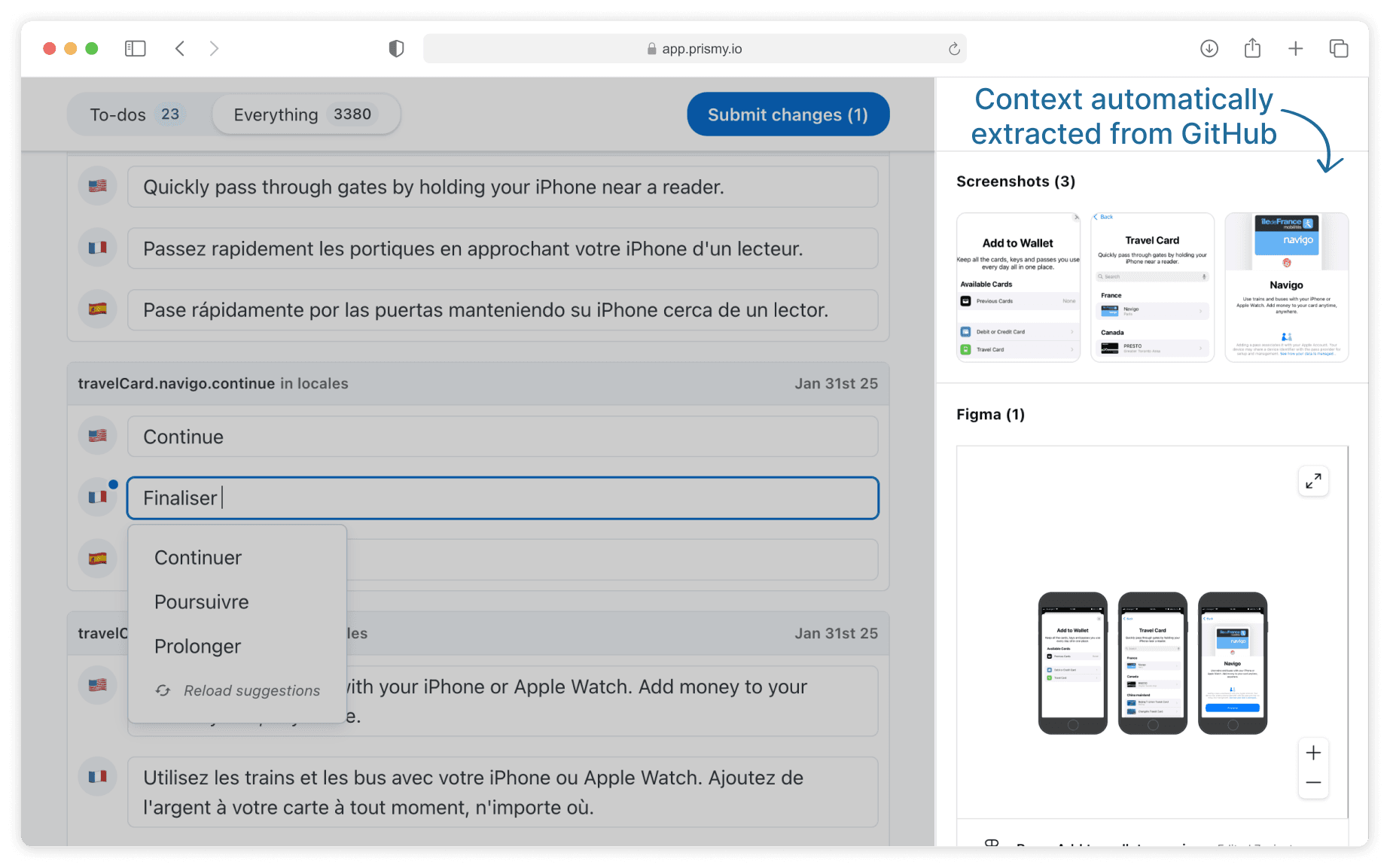
Jeder neue Key kommt mit PR-Beschreibung, Screenshots und Figma-Links.
Wenn ein Entwickler neue Strings in einem Pull Request einführt, hängt Prismy automatisch den Kontext zu jedem Key im Editor an: den PR-Titel und die PR-Beschreibung, Screenshots aus dem PR und alle im PR-Text verlinkten Figma-Links. Wenn ein Übersetzer einen Key öffnet, sieht er genau, wie die Funktion aussieht und was der Designer gemeint hat. Kein Hin und Her mit dem Dev-Team. Kein Rätselraten, was ein Button-Label ohne Kontext bedeutet.
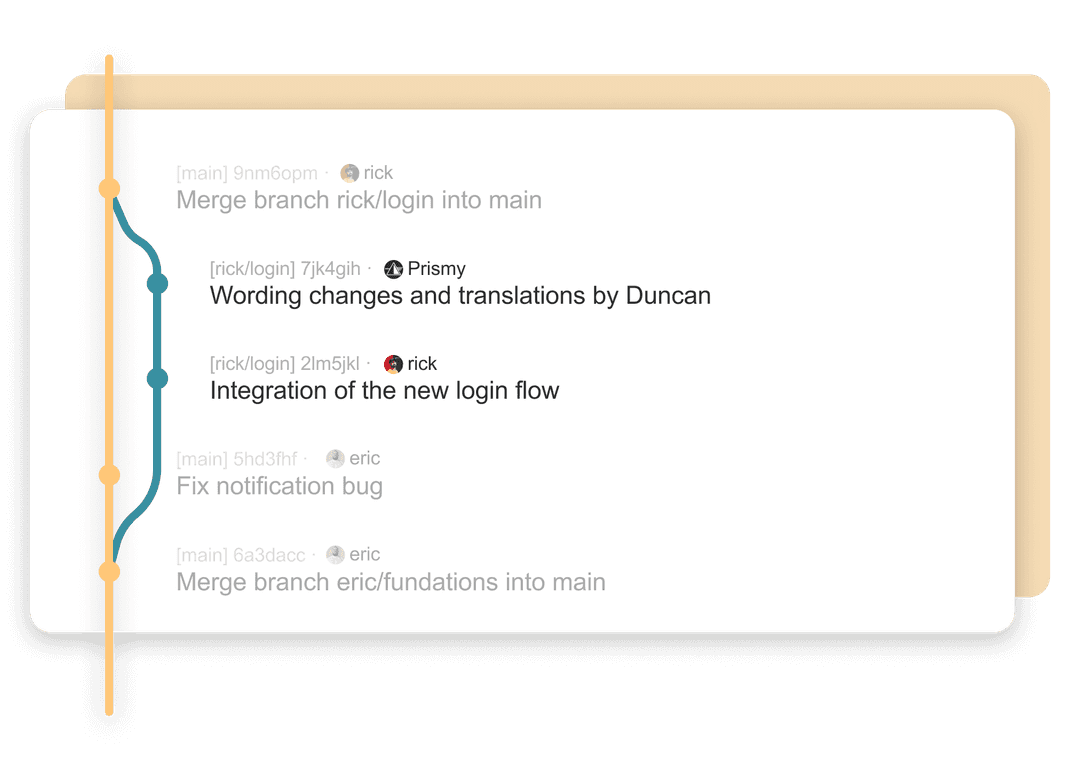
Null Merge-Konflikte in Ihren JSON-Übersetzungsdateien
Prismys PRs werden automatisch rebased und serialisiert. Ihr Team kämpft nicht mehr mit Merge-Hölle.
JSON-Übersetzungsdateien gehören zu den konfliktanfälligsten Teilen jeder mehrsprachigen Codebasis. Wenn zwei Entwickler oder ein Entwickler und ein Übersetzer parallel verschiedene Keys bearbeiten, scheitern Merges. Prismy serialisiert seine PRs und rebased sie automatisch auf Ihren Main Branch, damit Übersetzungsarbeit nie mit Feature-Arbeit kollidiert. Ihr Main Branch bleibt sauber. Ihre Entwickler lösen keine Übersetzungskonflikte mehr an einem Freitagnachmittag.
In Minuten eingerichtet. Ihre Übersetzungsdateien bleiben in GitHub.
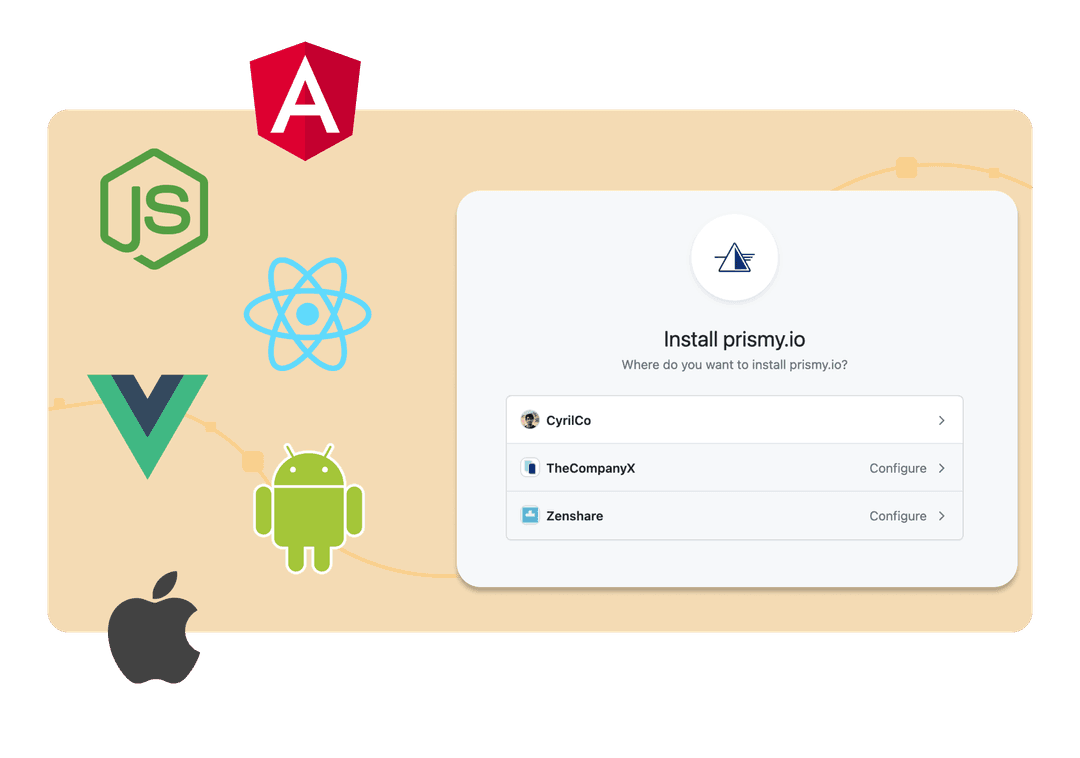
Ein-Klick-Installation der GitHub App. Kein CLI, kein YAML, keine CI/CD-Pipeline-Änderungen.
Installieren Sie die Prismy GitHub App in wenigen Klicks auf Ihrem Repository. Keine CLI zum Konfigurieren, kein GitHub-Action-Workflow zum Schreiben, kein CI/CD-Pipeline-Schritt zum Warten. Wählen Sie das Repo, definieren Sie Ihre Sprachdateien, und Prismy führt ab diesem Moment die Synchronisierung automatisch durch. Übersetzungen liegen immer in Ihrem Repository, nicht auf einer Drittanbieter-Plattform. Ihr Repo ist die zentrale Datenquelle, genau wie GitHub es vorgesehen hat.
So funktioniert GitHub-Lokalisierung mit Prismy
1
Installieren Sie die GitHub-App
Installieren Sie Prismy mit einem Klick in Ihrem GitHub-Repo, definieren Sie Ihre Sprachdateien, und Prismy synchronisiert sich ab dann automatisch. Kein CLI, kein YAML.
2
Erkennen und übersetzen
Jeder neue Pull Request wird analysiert. Prismy kommentiert den PR, wenn Übersetzungen fehlen. Generieren Sie AI-Übersetzungen mit einem Klick direkt aus dem PR-Kommentar. Prismy erstellt einen neuen Commit auf demselben Branch.
3
Mergen
Liefern Sie Ihre Funktion aus. Texte-Änderungen sind produktionsbereit. Keine Synchronisierung, auf die Sie warten müssen, kein Gate, das den Release blockiert, kein manueller Eingriff.
4
Verfeinern
PMs, Übersetzer und Reviewer nehmen jederzeit Texte-Änderungen vor. Direkt auf dem Feature Branch vor dem Merge oder über automatisch erstellte PRs in der Produktion. Konfliktfrei, immer.
Native GitHub-App
Ihr nächster PR wird bereits übersetzt ausgeliefert.
Installieren Sie die Prismy GitHub-App in wenigen Minuten auf Ihrem repo. Erkennen Sie fehlende Übersetzungen bei jedem PR automatisch, generieren Sie sie mit einem Klick und lassen Sie Ihr gesamtes Team Texte ändern, ohne ein einziges Entwickler-Ticket.
Häufig gestellte Fragen
Mit Prismy werden neue Strings bei jedem Pull Request automatisch erkannt. Kein manueller Auslöser, keine Synchronisierung nötig. Übersetzungen entstehen mit einem Klick. Sie nutzen das Glossar und die Tonalität Ihres Produkts. Der PR kann dann mit produktionsreifen Texten gemerged werden. Es gibt keine separate Plattform zum Einloggen und kein Hin und Her vor einem Release. Teams wechseln meist im selben Entwicklungszyklus von einem geöffneten PR zu einer übersetzten Funktion.
Prismy ist eine GitHub-App. Sie installieren sie mit einem Klick auf Ihrem repo. Sie hört auf Pull Requests, kommentiert bei fehlenden Übersetzungen und schiebt neue Commits mit generierten Übersetzungen. Es gibt keine GitHub Action in YAML, keinen zu wartenden CI/CD-Schritt und keine CLI zum Ausführen. Die GitHub-App übernimmt alles ab der Installation.
Unter fünf Minuten. Sie öffnen die Installationsseite der Prismy GitHub-App, autorisieren die Repos, die Sie verbinden möchten, und wählen Ihre Übersetzungsdateien aus. Ab diesem Moment erkennt Prismy fehlende Übersetzungen bei jedem PR automatisch. Keine CLI zum Konfigurieren, kein YAML zum Schreiben, keine CI/CD-Pipeline zum Ändern. Der erste automatisierte PR-Kommentar erscheint meist noch am selben Tag.
Prismy serialisiert seine PRs. Wenn mehrere Teammitglieder parallel verschiedene Keys bearbeiten, verarbeitet Prismy seine Übersetzungs-PRs nacheinander und rebased sie automatisch auf Ihren Main-Branch, bevor es sie öffnet. Ihr Main-Branch bleibt sauber, Ihre Feature-Branches kollidieren nicht mit Übersetzungsaktualisierungen, und Ihre Entwickler lösen keine Konflikte mehr in Übersetzungsdateien.
Ja. Prismy unterstützt GitHub.com, GitHub Enterprise Cloud und GitHub Enterprise Server (self-hosted). Wenn Ihre Organisation GitHub aus Sicherheits- oder Compliance-Gründen auf eigener Infrastruktur betreibt, kann Prismy sich verbinden. Für Teams mit strengeren Anforderungen bietet Prismy auch einen gehosteten Modus, bei dem Übersetzungsdateien in Prismys Datenbank gespeichert werden statt über eine direkte Repo-Verbindung.
Jede Person in Ihrem Team mit Zugriff auf das GitHub-Repo. Entwickler, PMs und Reviewer sehen alle denselben Prismy-Kommentar im Pull Request. Ein Klick auf die Schaltfläche „Übersetzungen generieren“ startet die AI-Generierung und schiebt einen neuen Commit. PMs und Nicht-Entwickler-Reviewer können Texte auch direkt in der Prismy-Web-App oder in der Chrome-Erweiterung bearbeiten, ganz ohne GitHub.
Prismy ist stack-unabhängig und unterstützt alle gängigen i18n-Formate: JSON, YAML, PO und POT, XLIFF, Android strings XML, iOS .strings und mehr. Es funktioniert mit jedem Framework oder jeder i18n-Bibliothek, die Übersetzungsdateien in Ihrem repo speichert: i18next, react-intl, next-intl, vue-i18n und individuelle Setups inklusive. Keine Migration nötig.
Ja, und genau das ist ein zentraler Teil des Nutzens. Sobald der Entwickler Prismy installiert, können PMs und Übersetzer Texte direkt ändern, auf Feature-Branches sofort als Commit oder in Produktion mit einem Konflikt-freien PR, den Prismy automatisch öffnet. Sie brauchen keinen GitHub-Zugriff und keine JSON-Dateien. Reviewer können außerdem die Chrome-Erweiterung von Prismy nutzen, um Copy direkt im Live-Produkt im WYSIWYG-Stil zu bearbeiten.
Crowdin und Lokalise nutzen ein Datei-Synchronisierungsmodell: Sie ziehen Ihre Übersetzungsdateien in ihre Plattform, Sie übersetzen dort, und sie spielen sie zurück. Prismy lebt in Ihren Pull Requests: Es erkennt fehlende Übersetzungen in jedem PR, stellt Übersetzern den vollständigen PR-Kontext bereit (Beschreibung, Screenshots, Figma-Links) und erstellt AI-Übersetzungen mit Ihrer spezifischen Produkt-Terminologie und Tonalität. Keine separate Plattform, die synchronisiert oder gewartet werden muss. Ihr Repo bleibt die zentrale Datenquelle.
Warum GitHub-Teams andere Lokalisierungstools für Prismy aufgeben
Jedes andere GitHub-Lokalisierungstool arbeitet gleich: Dateien in eine separate Plattform synchronisieren, dort übersetzen, Dateien zurück synchronisieren. Oder schlimmer, eine CLI, die nur der Entwickler ausführen kann. Prismy ist von Grund auf anders.
Teams liefern schneller aus.
Mit Erkennung auf jedem PR und Ein-Klick-KI-Übersetzungen warten Funktionen nicht mehr auf Lokalisierung. Keine Synchronisierung auszulösen, keine separate Plattform zum Einloggen, kein Hin und Her zwischen Entwicklern und Übersetzern vor einem Release. Textänderungen sind produktionsreif, wenn der PR bereit zum Mergen ist.
Eine GitHub App, kein CLI und keine GitHub Action.
CLIs wie Lingo.dev oder Languine verlangen YAML-Konfiguration, CI/CD-Änderungen und geben nur dem Entwickler eine Oberfläche. Prismy ist eine GitHub App, die sich mit einem Klick installiert und jeder Rolle in Ihrem Team eine eigene Oberfläche gibt. Ihr PM, Ihr UX Writer und Ihr Reviewer müssen kein Terminal anfassen.
Keine Synchronisierungsskripte zu schreiben und zu pflegen.
Verbinden Sie Prismy in wenigen Klicks, und es erledigt alles automatisch. Keine Webhooks zum Konfigurieren, kein CLI-Befehl zum Ausführen, kein YAML zum Warten. Lokalise, Crowdin und Localizely verlangen, dass Sie die Synchronisierung selbst einrichten und warten. Prismys GitHub App übernimmt alles ab dem Moment der Installation.
Übersetzer arbeiten mit Kontext, nicht mit Vermutungen.
Andere Tools verschieben Übersetzungsdateien in einen separaten Editor ohne Rückverknüpfung zur ursprünglichen Funktion. Prismy überträgt den PR-Kontext auf jeden Schlüssel: Beschreibung, Screenshots, Figma-Links. Übersetzer sehen genau, was sie übersetzen, nicht eine dekontextualisierte Zeichenkette in einem Tabelleneditor.
AI-Übersetzungen, die auf Ihr Produkt zugeschnitten sind, nicht auf das Internet.
Die AI in den meisten Lokalisierungsplattformen erzeugt generische Ausgaben. Prismys AI nutzt die benutzerdefinierten Anweisungen Ihres PMs, Ihr Glossar und Ihre vollständige Übersetzungshistorie (Translation Memory), um Texte zu erzeugen, die zu Ihrem echten Produkttext passen.
Das gesamte Team trägt bei, nicht nur der Entwickler.
Die meisten Dev-first-Tools geben Entwicklern einen guten Workflow, schließen aber alle anderen aus. Mit Prismy ändern PMs und Übersetzer Texte direkt, auf Feature Branches oder über automatisch erstellte PRs, ohne GitHub-Zugriff oder JSON-Dateien. Der Entwickler richtet alles ein und tritt dann zurück.
Funktioniert mit GitHub Enterprise und GitHub Enterprise Server.
Betreiben Sie GitHub in Ihrer eigenen Infrastruktur? Prismy unterstützt sowohl GitHub.com, GitHub Enterprise Cloud als auch GitHub Enterprise Server. Für Teams mit strengeren Sicherheitsanforderungen bietet Prismy außerdem einen gehosteten Modus, in dem Übersetzungsdateien in Prismys Datenbank verwaltet werden, statt eine direkte Repository-Verbindung zu benötigen.
GitHub-Lokalisierung, die Ihre Funktionen übersetzt und jedem das Bearbeiten der Texte ermöglicht.
Installieren Sie die Prismy GitHub-App, erkennen Sie fehlende Übersetzungen in jedem PR automatisch, geben Sie Übersetzern vollständigen Kontext und lassen Sie Ihr gesamtes Team Texte ändern, ohne ein Entwickler-Ticket.

Global gehen, auf einfache und kraftvolle Weise.

© 2026 Prismy. Alle Rechte vorbehalten.